
Turn Your Designer-Made Email Signature Image Into a Fully Interactive Signature in SigStudio

Need an email signature?
Turn Your Designer-Made Email Signature Image Into a Fully Interactive Signature in SigStudio

Many companies invest in beautifully designed email signatures created by a graphic designer. Often these signatures arrive as a PNG, JPG, or PDF mockup showing exactly how the brand wants every employee signature to look.

The problem is that an image isn’t a functional email signature.

Images cannot contain clickable phone numbers, accessible links, editable user details, or dynamic elements like banners and social icons. They also make signature management nearly impossible when details change across a team.

This is where SigStudio by Email Signature Rescue comes in.

SigStudio allows us to recreate your designer’s email signature image as a fully coded HTML email signature template, preserving the design while making it interactive, clickable, and easy to manage for your entire team.

Why Designer-Made Email Signature Images Don’t Work Well in Email

Graphic designers often create signatures the same way they design marketing graphics. This usually results in a flat image version of the signature.

While it looks great visually, it creates several limitations:

  • Phone numbers and emails are not clickable
  • Links to websites and social media cannot be tracked
  • Images scale poorly on different devices
  • Employee details cannot be updated easily
  • You must recreate the image every time someone changes roles or contact details

For businesses with more than a few staff, this quickly becomes unmanageable.
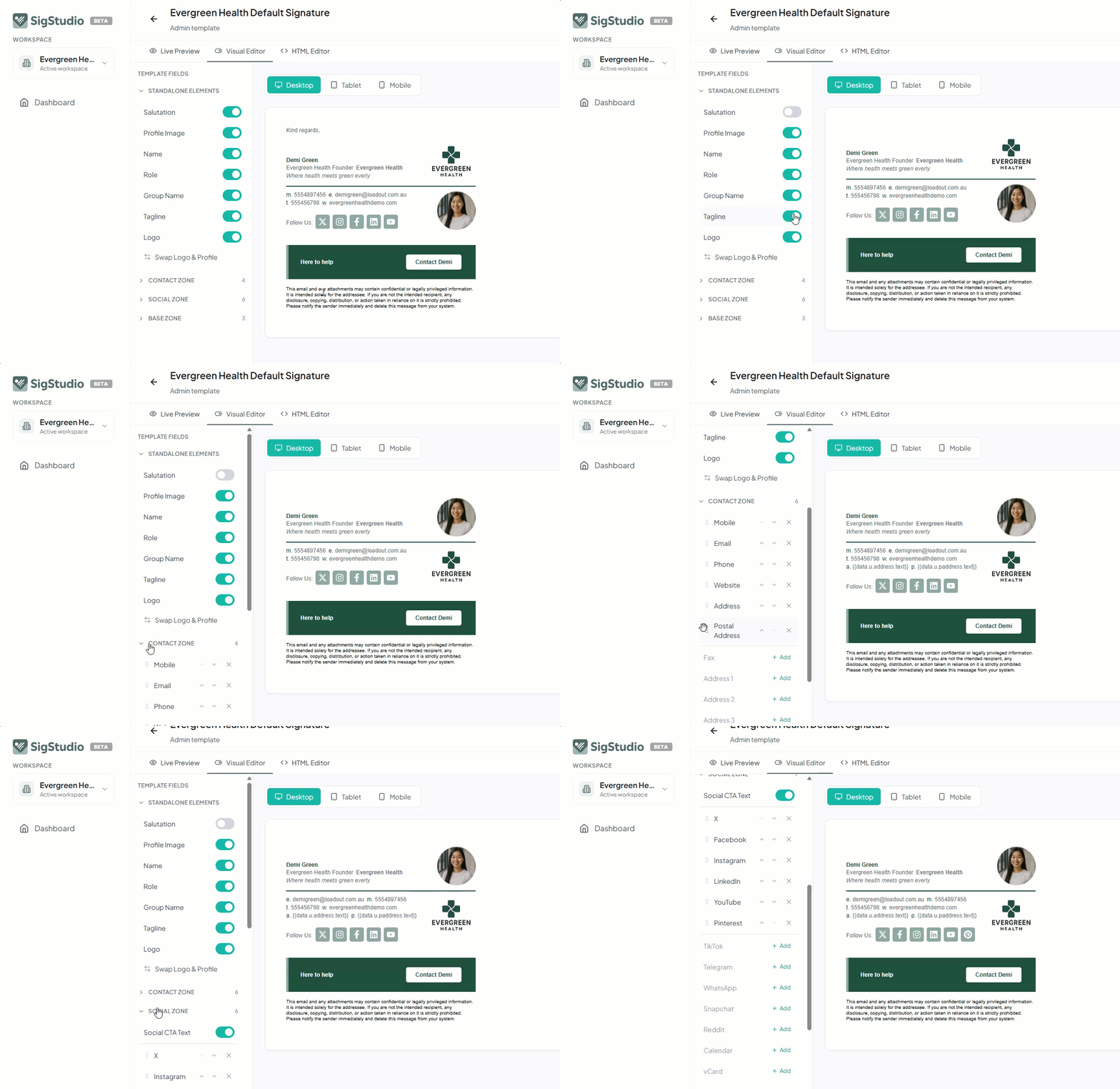
SigStudio.app by Email Signature Rescue - Interactive Visual Editor - make changes to any email signature design with toggles and sorting built-in

Converting Your Signature Design Into a SigStudio Template

Our team regularly converts designer-created email signature images into fully coded HTML email signatures inside SigStudio.

We carefully rebuild the design using email-safe HTML structure that works across all major email clients.

Your original design is preserved while gaining all the benefits of a real signature:

  • Clickable email addresses and phone numbers
  • Clickable website and social media links
  • Editable user details (name, role, phone, etc.)
  • Consistent layout across devices and email clients
  • Easy deployment across your team

The result looks identical to the designer’s mockup, but functions as a fully interactive email signature.


Turn Your Designer-Made Email Signature Image Into a Fully Interactive Signature in SigStudio
No items found.

Making the Signature Editable With the SigStudio Visual Editor

If you want even more flexibility for your team or clients, we can prepare your template to work with the SigStudio Visual Editor.

This is done by adding special ss-entity attributes to key parts of the signature.

These attributes allow the Visual Editor to control parts of the template without needing to edit HTML.

This means end-users can easily:

  • Turn contact fields on or off
  • Enable or disable social media icons
  • Add or remove promotional banners
  • Show or hide address details
  • Control which fields appear in their signature

For example, a template may include:

  • Phone
  • Mobile
  • Website
  • LinkedIn
  • Instagram
  • Banner promotion

With Visual Editor support, each user can toggle these elements on or off depending on what they need, while the overall design stays perfectly intact.

Email Signature by Email Signature Rescue / SigStudio

Perfect for Agencies and Designers

This service is especially popular with:

  • Marketing agencies
  • Branding agencies
  • Freelance designers
  • Businesses that already have a signature design

Instead of redesigning the signature from scratch, we simply convert your existing design into a smart template your client can manage themselves.

Your design remains the foundation — we just make it functional, scalable, and easy to maintain.

From Static Image to Smart Signature

By converting your email signature image into a SigStudio template, you transform a static graphic into a living, editable signature system.

Your team keeps the designer’s intended look while gaining:

  • Clickable links
  • Dynamic fields
  • Flexible layout controls
  • Easy team deployment
  • Visual Editor compatibility

This makes it possible for businesses to maintain their brand consistency while giving users control over their own signature details.

Need Your Designer Signature Converted?

If you already have a signature design created by a graphic designer, we can turn it into a fully functional SigStudio template ready for deployment across your team.

We’ll recreate the design using email-safe HTML and optionally prepare it for the SigStudio Visual Editor, allowing users to toggle fields, social icons, banners, and more.

Your beautiful design stays exactly the same - it simply becomes interactive, clickable, and easy to manage.

Try SigStudio today with a $1 trial for 30 days > Get Started

No items found.
Email Signature Template 1
Email Signature Template 2
100+ Professional Templates

Stand Out with Beautiful Email Signatures

Create professional email signatures that make a lasting impression. Easy to customize, easy to install in Gmail, Outlook, Apple Mail + 60 more email clients, apps and CRM.

Find Your Email Signature

Tips for Designers: How to Design an Email Signature That Can Be Converted to HTML

If you're a designer creating an email signature for a client, a few small design decisions can make the difference between a signature that looks great and works everywhere versus one that breaks when converted to HTML.

Email signatures are built using HTML tables, not modern website layouts like Flexbox or CSS Grid. Designing with this in mind will make conversion much smoother.

Here are some practical tips.

1. Avoid Background Images Behind Text

Most email clients do not reliably support background images, especially Outlook.

Instead of placing text over a background image, designers should:

  • Use solid background colors
  • Place text on colored blocks
  • Use simple image accents instead of full backgrounds

If a background design is required, we often need to slice the background into multiple images and reconstruct it in HTML tables.

Designing with solid color blocks makes the signature far more reliable.

2. Keep Layouts Simple and Structured

Email signatures work best when the layout follows a simple column structure, such as:

  • Logo on the left, contact details on the right
  • Profile photo on the left, details stacked vertically
  • Banner below the main signature

Complex overlapping layouts or floating elements are very difficult to recreate in HTML email.

Think in terms of rows and columns, similar to a spreadsheet.

3. Avoid Fancy Typography

Email clients cannot load custom fonts reliably.

Designers should stick to safe web fonts, such as:

  • Arial
  • Helvetica
  • Georgia
  • Verdana
  • Tahoma

If a brand font must be used, it may need to be converted to an image, but this should be used sparingly.

4. Design Social Icons Individually

Social media icons should be designed as separate icons, not part of one large graphic.

This allows us to:

  • Make each icon clickable
  • Allow users to enable or disable specific platforms
  • Rearrange icons easily

This works perfectly with the SigStudio Visual Editor, where users can toggle icons on or off.

5. Leave Room for Dynamic Fields

Remember that real email signatures contain variable user information, such as:

  • Name
  • Job title
  • Phone number
  • Mobile number
  • Address
  • Website

Designs should allow these fields to expand slightly without breaking the layout.

Avoid extremely tight spacing that only works for one name or phone number.

6. Design Banners as Separate Elements

If your signature includes a promotional banner, design it as a separate block below the signature rather than integrated into the main layout.

This allows businesses to:

  • Swap banners for campaigns
  • Enable or disable banners
  • Track clicks from banner links

Designing With Email in Mind

When email signatures are designed with HTML conversion in mind, they can be transformed into powerful, interactive signatures that work across all email platforms.

The goal is simple:

Design something beautiful, but also structured and flexible enough to work in email.

When done correctly, the final result preserves the original design while becoming clickable, editable, and manageable for the entire team.

Amy Lockwood is the Co-Founder of Email Signature Rescue with over a decade of experience in HTML email signatures for 60+ email clients, apps and CRM software including Outlook, Gmail, Apple Mail. She is the Head Designer of the Email Signature Rescue apps and website.

📩 Need help with your HTML email signatures? Contact Amy at emailsignaturerescue.com.

Ready to transform your email signatures?

FLYBY Signature
AUTHOR Signature
RAISE Signature
See Templates
OUR AWESOME CLIENTS

We work with
the best clients

Join our community of satisfied clients who trust us to create, host, manage and deploy their HTML email signatures.

4.8
Trustpilot Rating
200k+
Users Rescued
30M+
Hours Saved
10+
Years in the Business
1.1M+
Images Hosted